Clean Quote Quote confidently. Know your profit.

FOR INDEPENDENT RESIDENTIAL CLEANERS

Know your costs.
Send your quote.
See your profit.

A simple Excel kit to help you price cleaning jobs, prepare client quotes, and track what each job actually earns.

$27 USD once · Excel workbook + guides · 30-day money-back guarantee

CLEAN QUOTE Practice job

Your cleaning quote

$199.00
Labor, including owner time $100.00
Supplies + travel expense $18.00
Allocated overhead $15.00
Payment fees $6.27
Estimated operating profit $59.73
Margin 30.0%

Illustrative inputs, before income tax. No sales tax or discount in this example.

SEE IT IN 24 SECONDS

Watch it work.

24 seconds each. Voiceover and captions.
Listen or watch with the sound off.

Watch two more demos: discounts and two-person jobs

DEMO 02

Check a discount

See why 10% off the price can mean much less profit.

Read transcript

The example $199 job leaves $59.73 after entered costs and fees. Apply a 10% discount: service revenue becomes $179.10. With the same costs, profit falls to $40.43 and margin to 22.6%. That is $19.30 less profit, a 32.3% reduction. Review the scope or price before agreeing to a discount.

DEMO 03

Price a two-person job

Count each cleaner’s time and recalculate the quote.

Read transcript

Start with one cleaner at three on-site hours. Change to two cleaners at three hours each. Add half an hour of travel per cleaner and half a total person-hour of add-on work: 7.5 person-hours. At $25 per person-hour, labor is $187.50. With the other example costs unchanged, the suggested quote is $330 and estimated operating profit is $99.30. Estimate the actual time required for your crew.

Illustrative calculator walkthroughs. Your download is an editable Excel workbook; results depend on your inputs.

CLEAN QUOTE

Get the complete kit.

One download to price jobs, prepare client quotes, and track profit. No subscription.

$27 USD · one time

30-day money-back guarantee. Request a full refund within 30 days of purchase by emailing paul@getfieldkit.ai with your purchase email or receipt/order reference. Never send card details.

Included in the download

  • Four editable worksheets: Quote calculator, Client quote, Add-on pricing, and Job log
  • Quick-start guide with the worked residential example
  • Editable client messages and discovery checklist
Buy Clean Quote · $27

Secure checkout with Stripe. Your download opens after payment confirmation.

One ZIP download. Requires Excel or Google Sheets.

ONE KIT. THE WHOLE WORKFLOW.

What’s inside.

Four editable worksheets, plus a quick-start guide, client messages, and a discovery checklist.

Use in Excel or Google Sheets. A compatible spreadsheet app is required and is not included.

See the full contents
01

Quote & profit calculator

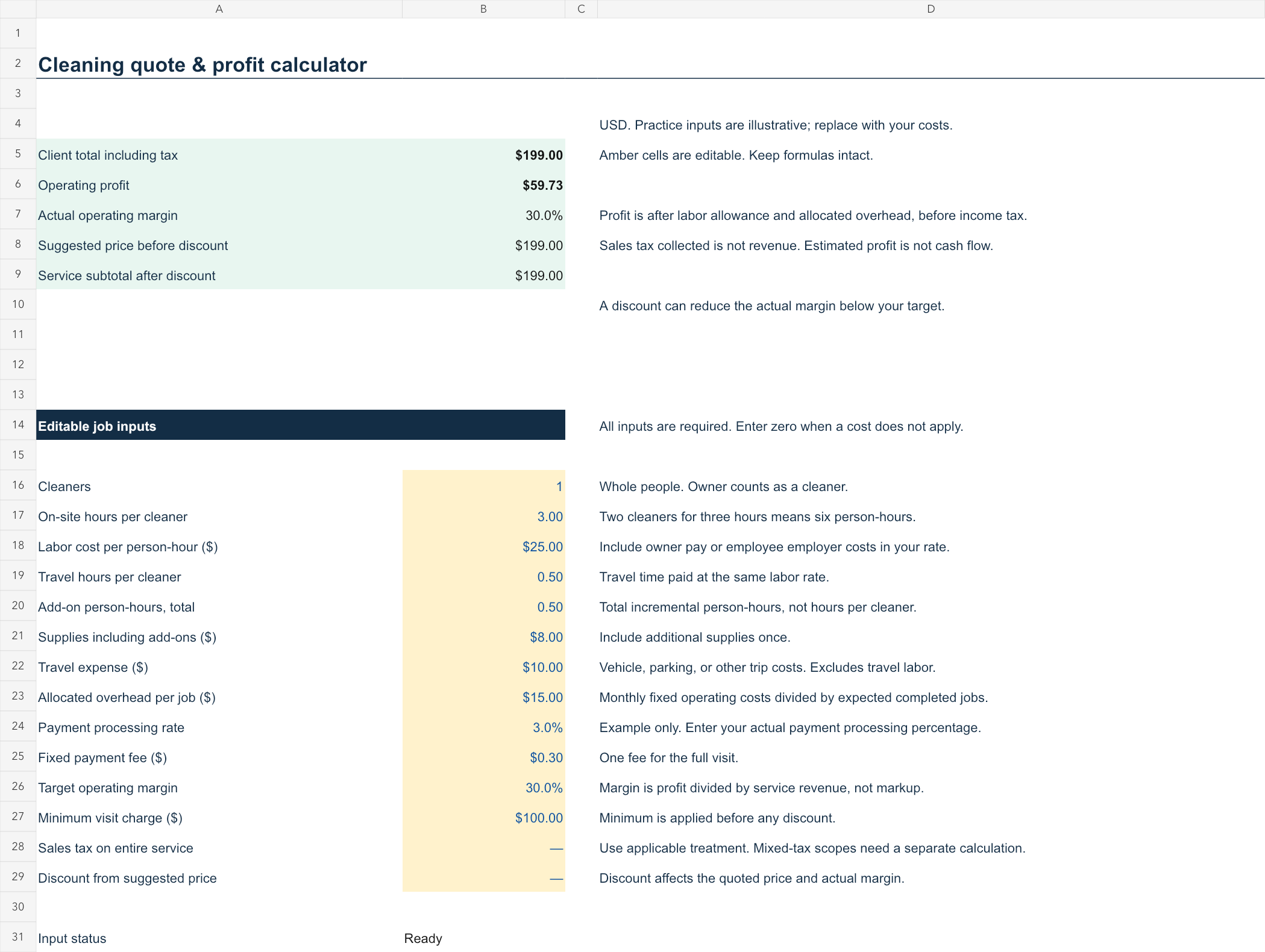
Labor, travel, supplies, overhead, tax, fees, margin, and discounts.

02

Client quote template

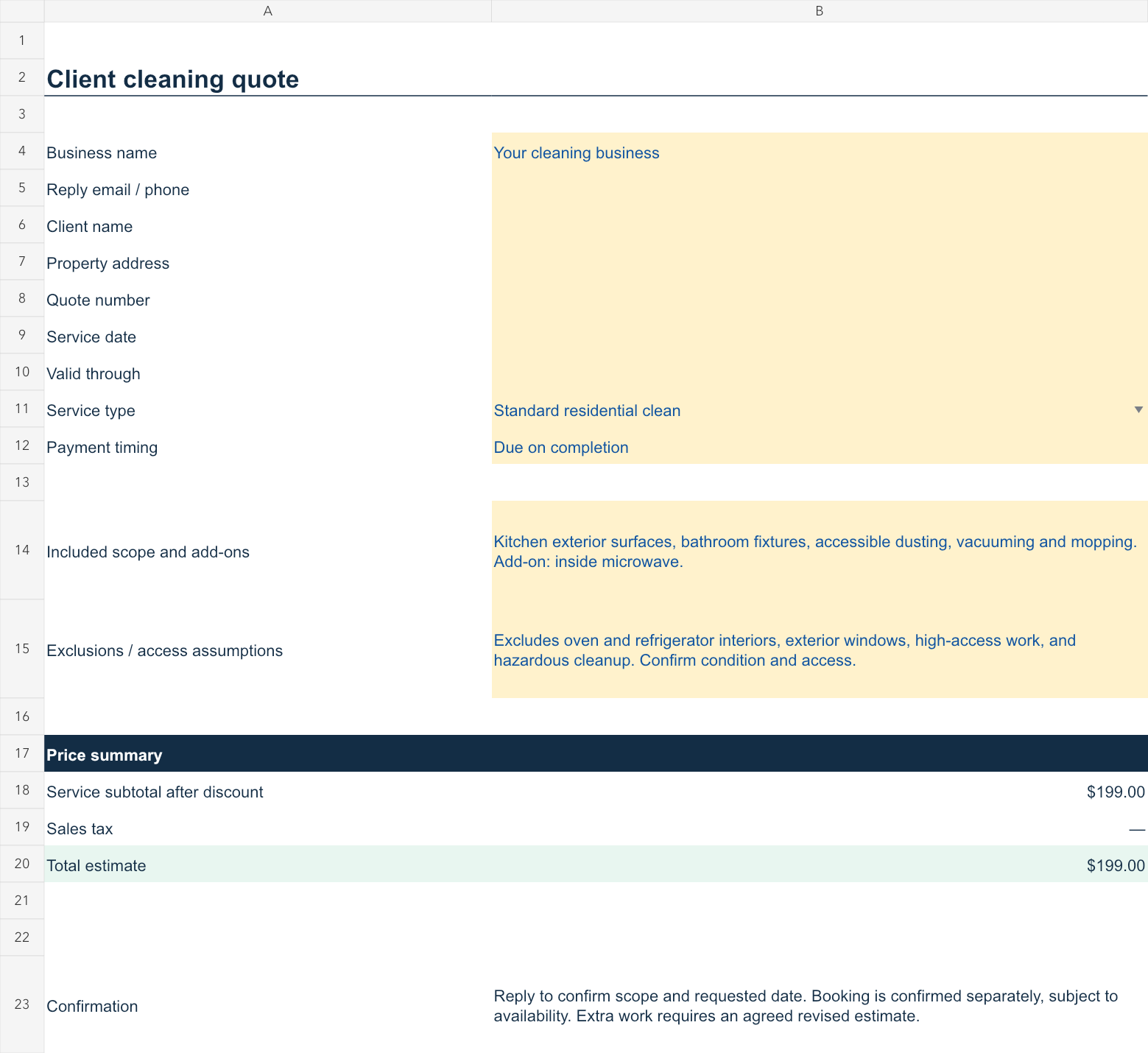
Business details, scope, exclusions, service subtotal, tax, and total.

03

Add-on pricing worksheet

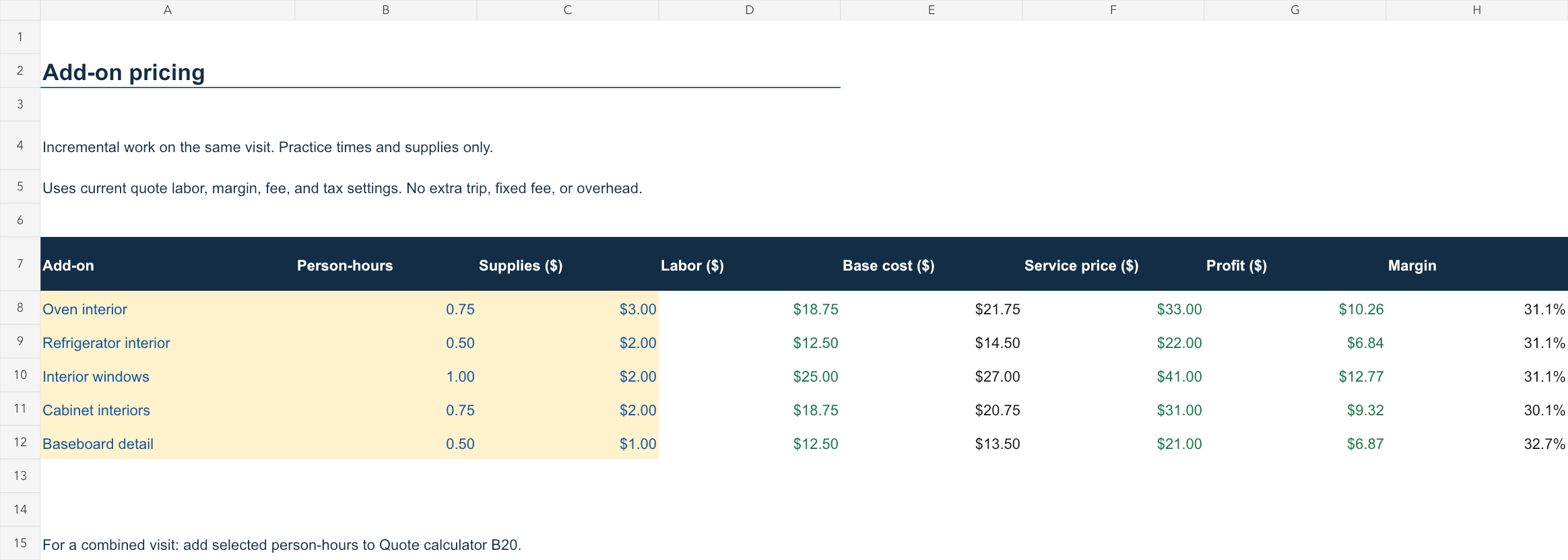
Estimate extra tasks using time, supplies, and your margin target.

04

50-job profit log

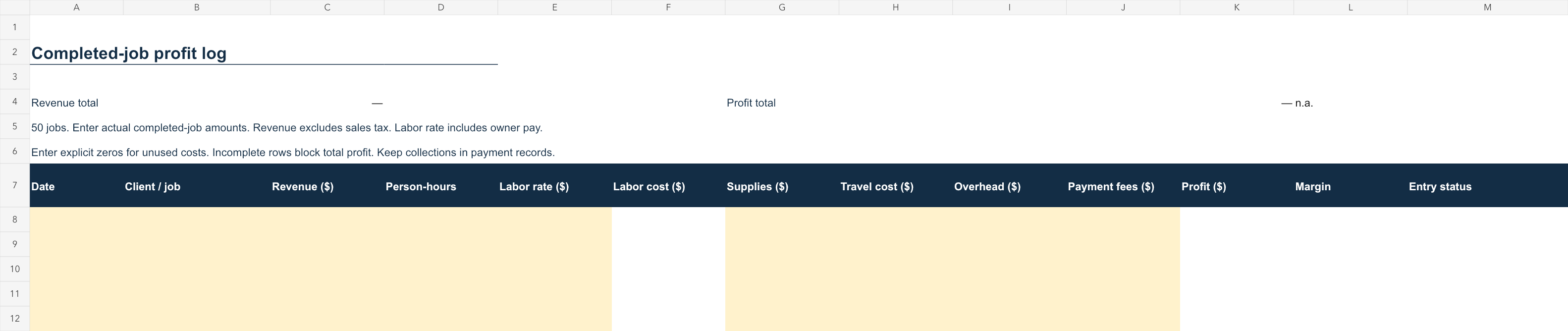
Record actual completed-job revenue and costs. See the resulting profit.

+

Quick start & client messages

A practice quote, inquiry checklist, and six editable client-message templates.

INSIDE THE WORKBOOK

See the worksheets you’ll use.

Preview all four worksheets. Select an image to see it full size.

Explore the complete $199 worked example
01

Define the scope

Standard residential clean with kitchen exterior surfaces, bathroom fixtures, accessible dusting, vacuuming, and mopping. Add-on: inside microwave. Excludes oven and refrigerator interiors, exterior windows, high-access work, and hazardous cleanup.

02

Estimate labor and costs

One cleaner × 3 on-site hours, plus 0.5 travel hour and 0.5 add-on person-hour = 4 person-hours. At an illustrative $25 labor allowance, labor—including owner time—is $100. Add $8 supplies, $10 travel expense, and $15 allocated overhead.

03

Build the client quote

Using a 30% target operating margin and illustrative payment fees of 3% + $0.30, the worksheet rounds the client quote to $199. The client-facing quote shows scope, exclusions, price, and payment timing—not internal costs.

04

Review the estimate

Client quote$199.00
Labor, including owner time$100.00
Supplies + travel$18.00
Allocated overhead$15.00
Payment fees$6.27
Estimated operating profit$59.73
Estimated margin30.0%

Before income tax. No sales tax or discount in this illustration.

05

Log the completed job

After the visit, enter actual $199 service revenue, excluding sales tax, actual person-hours and labor allowance, supplies, travel, overhead, and payment fee in the Job log. Compare the completed-job result with the estimate so the next quote uses better inputs.

A FEW QUICK ANSWERS

Before you buy.

What happens after I buy?

pay $27 USD one time through Stripe. After checkout, you’ll return to a download page. Your ZIP unlocks when Stripe confirms payment; some payment methods take longer. If confirmation is pending, use “Check payment again” or return to the page later—don’t place a second order.

Save and extract the ZIP, then open START-HERE.txt. It includes your four-sheet Excel workbook, quick-start guide with a worked example, six editable client messages, discovery checklist, and usage/support notes. The three on-page demos remain free to watch separately.

Keep your ZIP and receipt. The download page remembers your order in this browser for 30 days. If you lose access or need help, email paul@getfieldkit.ai with your purchase email or receipt reference. Your files arrive through the download page; the ZIP is not sent as an email attachment.

Is this for beginners?

Yes. The quick-start guide includes a worked example. You will need to estimate your time, labor rate, and business costs. Replace the illustrative inputs before quoting a real job.

Is it a website or an Excel workbook?

The product is a downloadable Excel workbook with text guides. The videos show simplified animated walkthroughs of its calculations. It does not include a hosted customer account or subscription service.

Does it tell me the going rate in my area?

No. It calculates a price from your inputs and target margin. It does not supply local market rates or guarantee that customers will accept a price.

Can I use it for recurring and deep cleans?

Yes. Enter the estimated time and costs for the specific visit, and clearly define the scope. The kit does not assume a universal deep-clean multiplier or recurring-service discount.

How do I share a quote with a client?

Complete the Client quote worksheet and export only that sheet’s client-facing range as a PDF. Keep the full workbook private because it contains internal costs.

Does it work in Google Sheets?

Yes. Upload the .xlsx workbook to Google Drive, open it with Google Sheets, then choose File → Save as Google Sheets. The practice quote, discount, two-cleaner calculation, add-on pricing, and job-log calculations have been checked in Google Sheets. Keep an untouched copy before entering your own numbers. Print layout can differ between apps.

How may I use the files?

You may customize and reuse the templates for your own cleaning business and share completed client quotes with your clients. You may not resell, sublicense, share, or redistribute the kit or its templates.

What is the refund policy?

Clean Quote has a 30-day money-back guarantee. Request a full refund within 30 days of purchase by emailing paul@getfieldkit.ai with the purchase email or receipt/order reference. You do not need to share card details.

How do I get help?

Email paul@getfieldkit.ai with your question. For order questions, include the email address you used at checkout. Never send card details.

Does profit mean cash in my bank account?

No. The estimate is after the entered labor allowance, costs, fees, and allocated overhead, before income tax. The job log tracks completed jobs. Payment timing and collections are separate.

Read the privacy notice

Stripe processes checkout and payment details. Clean Quote uses order references and payment confirmation to provide your download, handle support, and process refunds. Your completed worksheets are not uploaded to Clean Quote.

Purchase information. Stripe collects the contact and payment information entered at checkout. The Clean Quote download service stores a protected order reference, payment reference, purchase timestamp, and full-refund status. It does not store your card number. Authorized account operators can view transaction details in Stripe for order support and refunds. See Stripe’s privacy policy for its handling of checkout data.

Download access. After checkout, a secure cookie remembers your order in this browser for 30 days so the site can check whether your download is available. Clearing cookies or switching browsers can remove that access; contact support if needed. Keep your download link private.

Support and feedback. If you email us, we receive your email address and the information you choose to send. We use it to respond to your request. We ask your permission before publishing feedback. Please avoid sending card details or unnecessary information about your cleaning clients.

Storage and service providers. Order and refund records are retained to support download access, customer service, refunds, and transaction records. The site’s hosting providers process requests and may retain operational logs. Your workbook remains on your device or with the spreadsheet service you choose; Clean Quote does not receive the client details you enter there.

Questions or requests. Email paul@getfieldkit.ai about your information or to request access, correction, or deletion. Include your purchase email or receipt reference so we can identify the relevant order. Some transaction records may need to be retained.

Last updated September 17, 2026.